Weather Warning
Prerequisites
A running GroundControl VGRS installation with the WeatherWarning Service is required. The WeatherWarning Service can be selected during the GroundControl installation process. After installation, verify that GC.WeatherWarning.exe is present in the installation directory.
Data Format: The WeatherWarning Service currently supports only the XML format provided by www.weatherzone.com.au. You must configure a periodic download process to retrieve Weather Alert Information and place the XML file in a location accessible to GroundControl VGRS.
How it Works
The WeatherWarning Service runs as a background process and periodically reads the configured XML file. For each location, it evaluates the current lightning alert status and manages a per-location embargo.
Polling: Every IntervalInMinutes minutes, the service parses the XML file and extracts all locations with their current alert status.
Embargo mechanism: An embargo is an active publishing period for a specific location. Once a non-CLEAR alert is detected for a location, the service starts an embargo. During an embargo, a CustomEvent is repeatedly published at the NotificationIntervalInSeconds interval — this triggers matching rules in the Rule Engine.
The embargo ends when one of the following occurs:
- The alert status changes to
CLEAR→ embargo is cancelled immediately - The alert status changes to a different non-CLEAR value → old embargo is cancelled, a new one starts
- The embargo has been running for
MaxDurationInMinutes→ it times out automatically
Duplicate prevention: If the same alert status is still active on the next XML poll, the existing embargo continues unchanged — no new embargo is started and no duplicate events are sent.
Configuration
To configure the WeatherWarning Service, navigate to the Other section in the Manager Tool. The Weather Warning section provides all configuration options for the service.
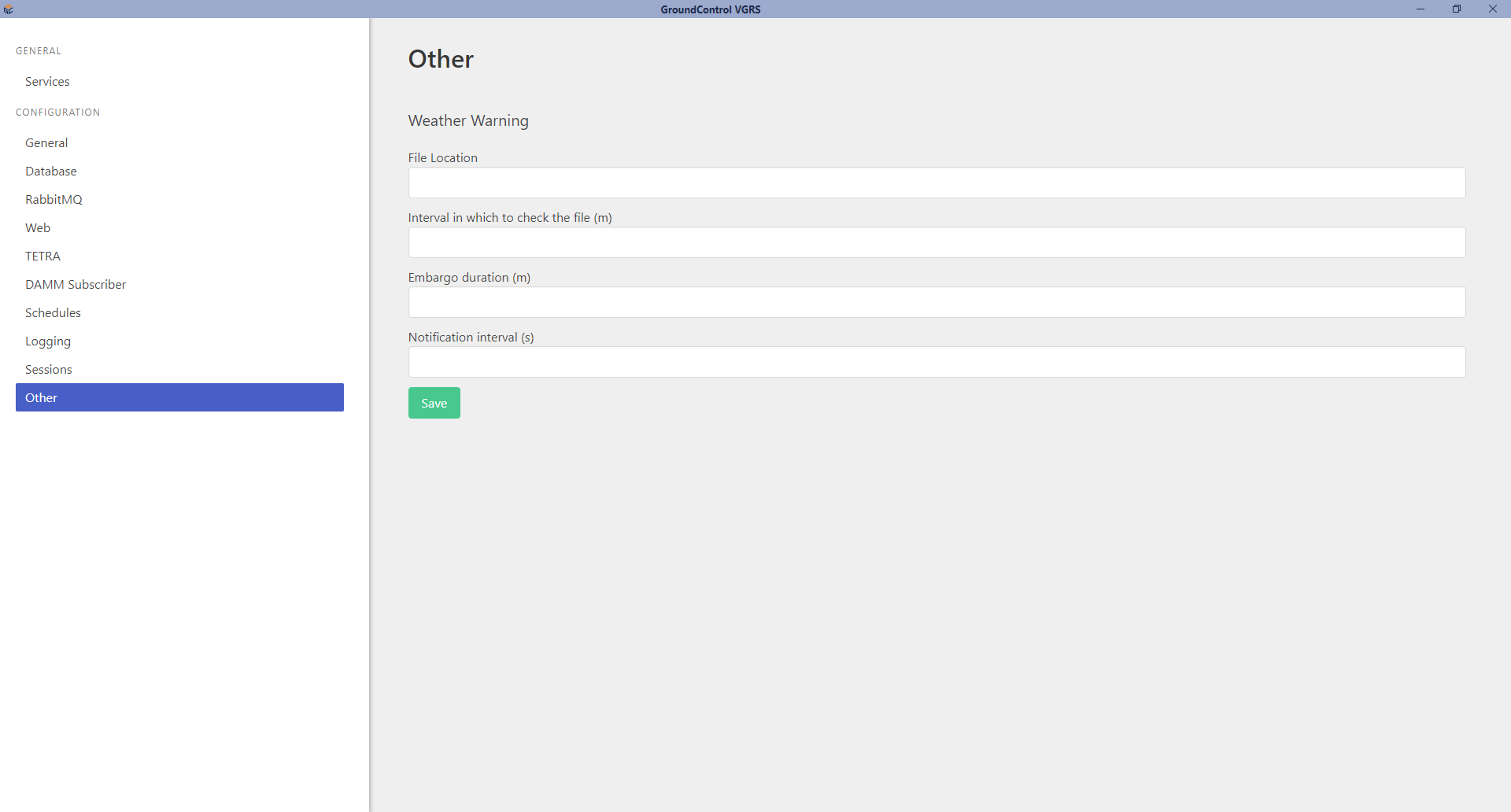
| Field | Description | Default |
|---|---|---|
| FileLocation | Path to the XML file containing Weather Alert Information. | Not set |
| IntervalInMinutes | Polling interval for checking the XML file for updates. | 5 minutes |
| Embargo | Configuration section for embargo behavior. | - |
| NotificationIntervalInSeconds | Interval at which the WeatherWarning Service triggers weather warning events. | 60 seconds |
| MaxDurationInMinutes | Maximum embargo duration before automatic cancellation. | 30 minutes |
Wildcard Support for FileLocation
The FileLocation field supports wildcards to match multiple files:
*matches any number of characters?matches exactly one character
If multiple files match, the newest file (by last modified date) is used automatically.
Examples: C:\WeatherFiles\*.xml · weather_??.xml · C:\Data\wz-*.xml
Configuration Best Practices
Align the polling interval with your data update frequency. For example, if the XML file updates every 10 minutes, checking every minute is unnecessary. Conversely, if updates occur every 2 minutes, a 1-minute polling interval ensures optimal response times.
Appsettings.json
Configuration changes via the Manager Tool are reflected in the appsettings.json file:
{
    "svc_ww": {
        "FileLocation": "",
        "IntervalInMinutes": 5,
        "Embargo": {
            "NotificationIntervalInSeconds": 60,
            "MaxDurationInMinutes": 30
        }
    }
}
Note: While manual editing is possible, configuration via the Manager Tool is recommended.
Setup WeatherWarning in GroundControl VGRS
Rules in GroundControl VGRS consist of three components:
- Event: Trigger that initiates the rule
- Conditions: Criteria that the event must satisfy
- Actions: Operations executed when conditions are met
Event
The WeatherWarning Service triggers CustomEvent events, which can be accessed in the Rule Engine to notify users or groups.
To handle WeatherWarning events, create a rule and select CustomEvent in the Event dropdown.
CustomEvent types support up to 10 dynamic parameters. The WeatherWarning Service populates these parameters with Weather Alert information:
| Parameter | Value | Description |
|---|---|---|
| Param_1 | "WeatherWarning" | Sender identifier. Always set to "WeatherWarning". |
| Param_2 | LocationName | Location name from the XML name attribute of the <location> tag. |
| Param_3 | LocationCode | Location code from the XML code attribute of the <location> tag. |
| Param_4 | AlertType | Alert type from the XML type attribute of the <alert> tag. Supported: LIGHTNING. |
| Param_5 | AlertStatus | Alert severity from the XML status attribute. Supported: BLUE, YELLOW, AMBER, RED, CLEAR. |
Param_1 always contains "WeatherWarning" to identify events originating from the WeatherWarning Service, allowing rules to filter specifically for weather-related events.
Use these parameters to define conditions that route Weather Alerts to the appropriate radios.
Case Sensitivity
The Rule Engine is case-sensitive. Location names and alert statuses must match exactly as provided in the XML.
Conditions
A typical condition configuration:
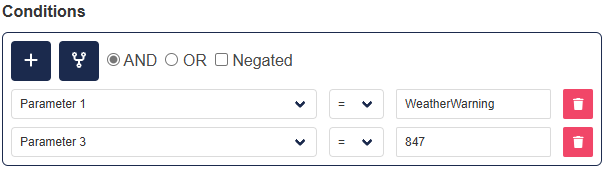
Parameter 1 = "WeatherWarning": Ensures the rule applies only to WeatherWarning events.
Parameter 3 = "847": Filters for the specific LocationCode "847", ensuring the rule applies only to alerts for that location.
Alternative: You can filter by Parameter 2 (LocationName) instead of Parameter 3 (LocationCode), but exercise caution if multiple locations share the same name.
Actions
Define actions to execute when all rule conditions are satisfied.
Common Use Case: Notify specific radios or groups when a weather alert is received. This can be achieved by sending text or voice messages using the corresponding actions.
Recipient Configuration: Actions require a Recipient attribute specifying an SSI (Short Subscriber Identity) from your TETRA network: - ISSI (Individual SSI): Targets a specific user - GSSI (Group SSI): Targets a group of radios
Dynamic Group Management via GeoFence: Use GeoFences to automatically manage group membership. Assign a GSSI to a GeoFence covering the alert region. Radios entering the GeoFence automatically join the associated group.
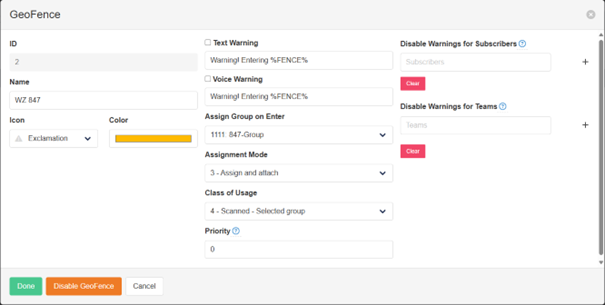
Example: The GeoFence above is associated with Weather Zone 847. When a radio enters this GeoFence, it automatically joins the "1111: 847-Group" group.
With this configuration, the following action can be defined:
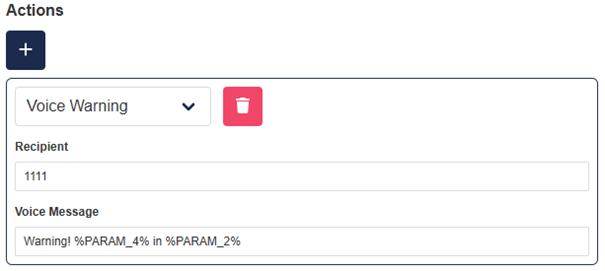
Result: A voice message is sent to all radios in the 1111 group. Every radio within the "WZ 847" GeoFence receives a notification whenever a WeatherWarning event is triggered in GroundControl VGRS.